


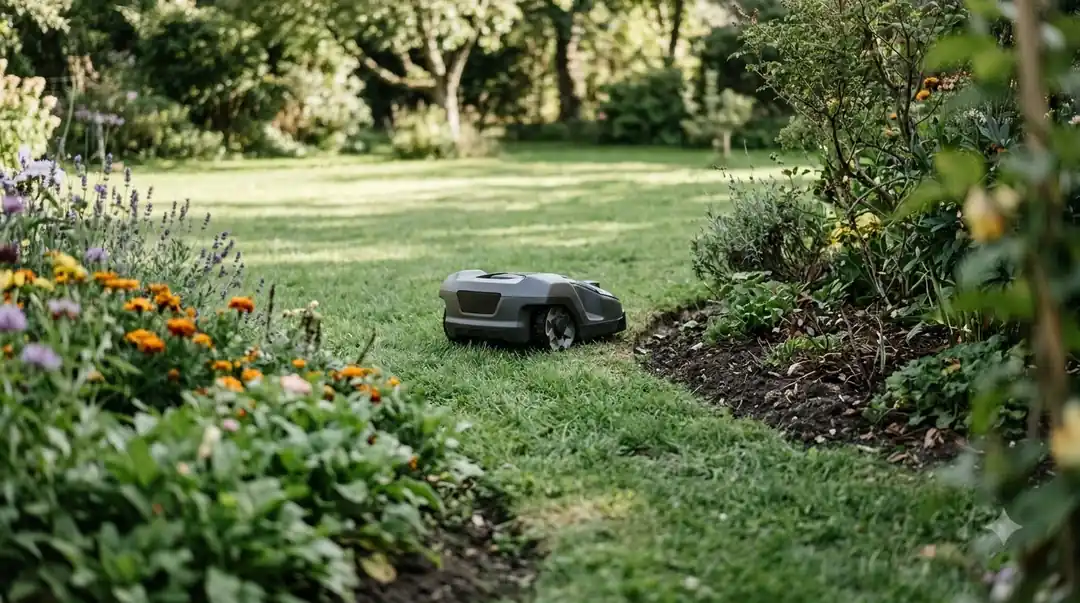
Why does my robot mower turn around before reaching the edge? Most often, your mower is reacting early to a programmed boundary buffer, an obstacle sensor triggered by tall grass or edging, or electromagnetic interference from nearby metal or a neighbor’s perimeter loop. Both boundary-wire and wire-free RTK or vision mowers rely on strict safety margins so they do not wander into flower beds, drop off curbs, or clip hard surfaces. Once you match the early-turn behavior to your navigation type, adjusting a setting, trimming overgrown borders, or shifting a wire usually fixes the uncut strip.
The short answer
- Conservative boundary offsets: Default “drive past wire” distances on wired bots or wide virtual safety buffers on GPS/RTK models force the chassis to pivot well short of the lawn border.
- False obstacle triggers: Radar, ultrasonic, or camera sensors often mistake thick perimeter grass, overhanging shrubs, or raised stone edging for solid barriers.
- Signal distortion and loop conflicts: Metal fences, buried utility lines, or a neighbor’s boundary wire within 3 ft. can scramble loop signals and trigger premature turns.
- Degraded satellite or visual lock: Tree canopy or tall walls near the perimeter can push an RTK mower from a centimeter-level fix into a wider safety margin.
- App zone and stay-out overlap: Waypoints or virtual no-go zones drawn too close to the outer border cause the mower to treat the edge as an internal barrier.
How boundary offsets and safety margins stop mowers early
Every robotic lawn mower is built to stop before its blades cross a perimeter, which means factory defaults intentionally leave a buffer strip unless you fine-tune them.
On boundary-wire machines, the mower detects the electromagnetic field radiating from the buried or pegged loop. Because different yards have different border transitions—a flush patio versus a sharp drop-off into mulch—manufacturers set a conservative default distance for how far the nose crosses the cable before reversing. According to Husqvarna Automower support documentation, if a boundary wire is laid farther from obstacles than recommended or the “drive past wire” distance is set too short, the mower pivots early and leaves an uncut strip along the border.
Wire-free mowers using RTK-GNSS satellite positioning or vision cameras apply a similar cushion digitally. Virtual boundaries act like geofences: when satellite signal confidence drops near a fence or roofline, the software widens its safety buffer so the machine does not drift outside the yard. As noted in the RTKdata accuracy guide, horizontal accuracy in open sky sits around 1 to 2 centimeters with a solid RTK fix, but drops to float-level precision under trees or near walls, prompting the mower to turn early rather than risk crossing the line.

| Cause of early turn | Mower type affected | What it looks like in the yard | Primary fix |
|---|---|---|---|
| Short “drive past wire” or wide virtual buffer | Wired, RTK, and Vision | Consistent uncut band of equal width along straight edges | Increase overshoot distance in app or remap closer to flush borders |
| Obstacle sensors reading tall grass as solid objects | Radar, ultrasonic, and camera bots | Mower slows down, hesitates, and turns in patches of thicker turf | Trim perimeter grass manually or reduce sensor sensitivity near edges |
| Electromagnetic interference from metal or adjacent wire | Boundary-wire mowers | Erratic reversing or early pivots only near fences, gates, or property lines | Keep 3 ft. clearance from neighbor wires and shift cable away from metal |
| Satellite signal drop (RTK float) under canopy | RTK-GNSS wire-free mowers | Early turns happen specifically under trees or beside tall walls | Relocate RTK reference antenna to open sky and widen hazard buffers |
| Overlapping app waypoints or stay-out zones | GPS-assisted and mapped bots | Mower turns sharply at one specific corner or along a mapped zone seam | Edit map vertices in the app so work-area lines sit cleanly inside borders |
Why obstacle sensors mistake lawn edges for walls
Modern mowers equipped with radar, ultrasonic emitters, or AI cameras frequently interpret dense border vegetation or raised landscape edging as physical collisions waiting to happen.
Unlike older bump-only robots that physically tap a fence before turning, active obstacle-avoidance systems scan ahead and trigger a turn before contact. When grass along a fence line grows taller or thicker than the main lawn—often because the mower missed it on earlier passes—radar and ultrasonic sensors can register those blades as a solid object. Husqvarna notes in its sensor guidance that high grass or tall dandelions can trigger object avoidance, and that some models automatically disable object avoidance within 60 cm (2 ft.) of an EPOS virtual boundary or 90 cm (3 ft.) of a boundary wire specifically to prevent uncut edges.
Camera-based mowers face a related optical challenge at perimeter transitions. Sharp shadows cast by privacy fences, dark mulch beds right next to bright green turf, or reflective stone pavers can confuse visual edge detection. If a mower encounters strong glare or deep shade along the same wall every afternoon, it may repeatedly treat the shadow line as the end of the grass and pivot several feet short.
Signal interference and wiring quirks that trigger false turns
For boundary-wire installations, invisible electrical and metallic interference can distort the loop signal so the mower thinks it has already reached the edge.
A boundary loop acts like a low-frequency radio antenna. When the wire runs tightly parallel to a steel fence, metal landscape edging, rebar-reinforced concrete, or buried power cables, those metal structures can absorb or warp the magnetic field. The mower’s front coil reads the distorted field early and executes a turn a foot or two before the actual wire. Corroded splices or partially nicked insulation can also weaken loop strength, causing the mower to lose confidence in its position and reverse prematurely in far corners of the yard.
Neighboring robotic mowers create another common conflict. According to Worx Landroid troubleshooting guidelines, if another robotic mower’s boundary wire sits too close to yours, the overlapping signals can cause the unit to reverse or rotate erratically near the perimeter. Maintaining at least 3 ft. of clearance between parallel boundary wires—or switching loop frequencies on systems that support multiple channels—prevents cross-talk.
Heads up
Before changing software settings or digging up wire, clean dried grass clippings and mud off your mower’s front bumper, ultrasonic transducers, and camera lens. A thin film of damp turf debris can scatter sensor beams and make the robot behave as if an obstacle is permanently sitting in front of it.
App mapping and zone settings that cut corners short
Software boundaries, multi-zone waypoints, and tight corner layouts can silently instruct your mower to turn around well inside your physical property line.
When setting up multi-zone lawns in a companion app, placing a work-area waypoint or virtual corridor too close to the outer perimeter can create a logical conflict. Husqvarna’s Automower Intelligent Mapping (AIM) support notes that placing work-area waypoints close to the boundary wire can cause the mower to stop and turn early when it detects the edge of the internal work area instead of continuing to the perimeter loop. Similarly, drawing a stay-out zone around a tree or garden bed right next to the outer border leaves a narrow channel that the mower refuses to enter, forcing it to U-turn early.
Tight 90-degree corners on wired lawns also cause premature turns. If a boundary wire makes a sharp right angle rather than two 45-degree chamfered turns, the signals from the two perpendicular segments overlap in the corner, creating a stronger combined field that pushes the mower away before its blades reach the grass in the point.
Step-by-step troubleshooting to get clean edge cuts
Working through hardware checks before software tweaks lets you pinpoint why your mower stops short without redoing your whole yard layout.
- Clean all perimeter sensors and wheels. Power off the mower, wipe camera lenses, radar covers, or ultrasonic sensors with a microfiber cloth, and clear packed grass from the front caster wheels so the chassis tracks straight.
- Trim overgrown border grass once manually. Use a string trimmer to knock down tall grass along fences and beds; if the mower suddenly reaches the edge afterward, thick vegetation was triggering its obstacle sensors.
- Check the charging dock light and wire splices. Confirm a solid green loop indicator on wired bases, inspect waterproof connectors for moisture, and verify that any island wires running to trees lie tightly together without crossing.
- Inspect for metal or neighbor wire proximity. Check whether early turns happen exclusively near metal gates, steel edging, or a neighbor’s fence line, and shift the wire inward or maintain at least 3 ft. of separation from adjacent loops.
- Adjust overshoot or remap the border in the app. Increase the “drive past wire” setting in small increments for flush walkways, or re-walk virtual boundaries under clear sky with a confirmed RTK fix, keeping wider safety buffers only near pools, drop-offs, and driveways.
Frequently asked questions
How far past the boundary wire should a robot mower drive?
Most manufacturers recommend setting the drive-past-wire distance so the front wheels cross the cable slightly while the spinning blades stay safely inside the lawn edge, typically around 8 to 12 inches depending on deck offset and border height. Use shorter overshoot distances next to walls, gravel, or drop-offs, and slightly longer distances where grass meets a flush concrete sidewalk.
Why does my robot mower turn around only in one specific corner of the yard?
Localized early turns usually point to a site-specific trigger rather than a broken mower. Common culprits include a sharp 90-degree wire corner where signals overlap, a buried metal pipe or steel fence post distorting the loop, overhanging tree branches blocking RTK satellite reception, or an app waypoint placed too close to the outer border.
Can tall grass along a fence make a robot mower turn around early?
Yes. Mowers equipped with radar, ultrasonic, or vision obstacle avoidance can mistake thick, overgrown perimeter grass or tall weeds for a solid barrier and pivot before cutting them. Trimming the edge down to normal lawn height once with a string trimmer usually restores normal edge tracking.
Should I set the boundary buffer to zero on a wire-free RTK mower?
No, setting zero margin is risky unless the lawn borders a flush, mower-safe patio. Even high-precision consumer RTK mowers experience occasional centimeter-to-decimeter drift when satellite geometry shifts or tree leaves thicken, so keeping a modest buffer protects blades and prevents the bot from slipping off curbs or into mulch beds.
Sources
- What is EdgeCut and how do I use it? (Husqvarna UK Support): Used for boundary wire placement effects on uncut grass and drive-past-wire adjustment behavior.
- Object avoidance with radar or ultrasonic sensors in Automower robotic lawn mowers (Husqvarna IE Support): Used for tall grass sensor sensitivity and automatic boundary disable distances (60 cm EPOS / 90 cm boundary wire).
- Landroid reverses or rotates erratically near the boundary wire (Worx North America Support): Used for the 3 ft. clearance requirement between neighboring robotic mower boundary wires.
- Wire-free Robot Mower RTK Accuracy Guide for Precise Boundary (RTKdata): Used for RTK fix (1–2 cm) versus float accuracy behavior near tree canopy and walls.
 Up next8 min readLearnWhy Does My Robot Mower Leave Unmowed Circles Around Trees?Updated Nov 19, 2026
 8 min readLearnWhy Does My Robot Mower Skip Shaded Areas of the Lawn?Updated Nov 19, 2026
 9 min readLearnWhy Does My Robot Mower Spin Its Wheels When Turning?Updated Nov 19, 2026
 8 min readLearnWhy Does My Robot Mower Battery Lose Charge While Docked?Updated Nov 19, 2026
 9 min readLearnWhy Does My Robot Mower Stop When Crossing Patio Pavers?Updated Nov 19, 2026
 9 min readLearnWhy Does My Robot Mower Beep Three Times on the Dock?Updated Nov 19, 2026