

Mammotion LUBA RTK no fix usually means the mower is not getting a good correction signal, and the cause is most often the reference station, the sky view at the station or the mower, or an obstacle near the mower. Read the status label in the app first, then the satellite counts, then the reference station LED. Mammotion’s support pages describe that order.
The short answer
- Fix is the only label that allows auto mowing. Float, Single and None all block it, according to Mammotion support.
- Check the reference station before the mower. Its LED should be a constant green between 8:00 and 18:00, and its radio antenna must be attached.
- Keep the station at least 3 m (10 ft) from any wall or tree. Mammotion’s install guide gives that clearance.
- Edit the boundary if the mower stops in one spot. Support suggests moving the boundary corner away from coverage, or setting trees and iron furniture as no-go zones.
What the status labels mean: Fix, Float, Single, None
The LUBA app reports one of four positioning states. Mammotion’s support article describes them with accuracy figures, and only the top one is treated as safe for automatic mowing. A Float or Single reading does not mean the mower is broken. It means the correction data is not stable enough for the boundary to be trusted.
| Label | What Mammotion says | Auto mowing |
|---|---|---|
| Fix | Fine positioning, accuracy under 10 cm and up to 2 cm in good open sky | Allowed |
| Float | Bad positioning, accuracy about 50 to 200 cm | Not allowed |
| Single | Bad positioning, meter-level accuracy | Not allowed |
| None | No positioning at all | Not allowed |
Float is the label most owners see with no fix. It is the middle state: the mower still has some correction data, but not enough to hold centimetre accuracy. Single is worse, and None usually points to a connection or hardware fault rather than a weak sky.
Mammotion LUBA RTK no fix: read the satellite counts in order
The app shows three counts: satellites the LUBA can see, satellites the reference station can see, and co-viewing satellites that both can see. Co-viewing is the number used for the RTK calculation. Mammotion says more than 20 satellites on both L1 and L2 gives stable RTK, but it also warns that a high count does not guarantee a fix if signal quality is weak.
Our reading of the support scenarios is that the counts tell you which side to check when a mammotion luba rtk no fix message appears. If the reference station and co-viewing counts are both below 20 on L1 and L2, the station is not seeing enough sky. If the LUBA count is below 25 and co-viewing is below 20, the mower’s own location is the likely problem. If every count reads zero and the link is None or weak, start with the station’s power and cabling, not the boundary.
Check the reference station first
The reference station is the fixed receiver that sends correction data to the mower, so a fault there shows up as Float or Single on the mower. Mammotion’s poor positioning guide lists four checks, in this order: the station sits in an open-sky spot, its LED is solid green, the power cable is seated, and the power adapter works. If the LED is off, the adapter is the first thing to test.
The install guide adds two placement rules. Keep at least 3 m (10 ft) between the station and any wall or tree. Mount it on flat, open ground or on an unobstructed wall or roof, and make sure nearby roofs or trees do not block the satellites.
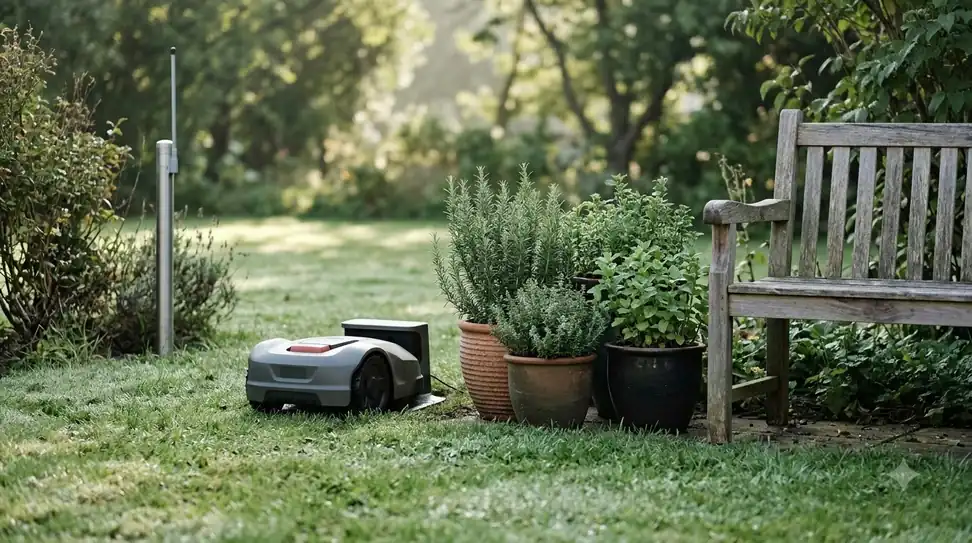
When the station is replaced, it must be paired again in the app before it will send corrections to the same LUBA. Mammotion’s support article on a no-data station says to check for water inside the unit and confirm the radio antenna is attached.
When the mower itself is the problem
If the station checks out, look at the LUBA side. Support’s scenario for Float with LUBA satellites below 25 and co-viewing below 20 says to check the mower’s location, especially on the charging station, and to look for tall trees, walls or metal walls nearby.
The fix depends on where the mower sits. If the charging station is in a shaded spot, move it to a more open area. If the mower loses signal at the boundary or a corner, use the modify-boundary function to move that corner away from the coverage. If the trouble is inside the lawn, set the obstacle as a no-go zone. Trees, iron tables and chairs are the examples Mammotion names.
Two cases are different. When LUBA reports zero satellites and zero co-viewing, check whether it is indoors or whether metal covers its rear. If it still reads zero after that, support treats it as a possible defect and points to aftersale support.
Why trees, walls and buildings break the fix
Satellite signals reach the mower or the station on a direct path. Obstructions cut the number of visible satellites, and signals that bounce off a nearby surface can arrive late and add error, which is called multipath. Trimble’s RTK guide describes both effects, and the same mechanism explains why a fix drops when the mower passes under a tree line or a wall.
Sunseeker’s RTK explainer says walls, roof overhangs and heavy tree cover weaken accuracy, and that a base should not sit under them. That is a vendor statement, so treat it as guidance rather than a measured limit. RTKdata’s third-party accuracy guide, which cites NGS, puts the clear-sky requirement at roughly 15 degrees above the horizon. Our reading is that a station behind a roofline or a fence line can lose that clear sky even if the yard looks open at ground level, and that is a common reason a mammotion luba rtk no fix shows up only near one side of the lawn.
Steps to follow in order
- Read the label. Note whether the app shows Fix, Float, Single or None, and the three satellite counts.
- Check the station LED. It should be a constant green during the day, from 8:00 to 18:00 local time.
- Check power. Confirm the cable is seated, the adapter works, and there is no water inside the station.
- Check the station’s spot. Keep it 3 m or more from walls and trees, with clear sky above.
- Check the LUBA’s spot. If counts are low on the mower side, look at the charging station position and boundary corners.
- Set obstacles as no-go zones where the mower loses signal beside trees or metal furniture.
- Re-check the label after each change before you let the mower mow automatically.
When to contact support and what to send
If the label still does not reach Fix after these steps, send Mammotion support the evidence it asks for. The poor positioning guide lists a video of the area where the mower stops, a screenshot of the position information in the app, and a Log-feedback report from the app. Large videos go by email to support@mammotion.com. Our reading is that a clear video and the log do more to speed up a diagnosis than a description alone.
Until the label reads Fix, Mammotion’s own rule is that auto mowing is not allowed, so the boundary should be treated as unverified. That is the practical point of the whole check: a Fix reading is the signal that the boundary and the mower’s position agree.
Frequently asked questions
Can a LUBA mow automatically with a Float reading, when the app says no fix?
Mammotion’s support article says auto mowing is not allowed at Float, Single or None. Only Fix allows it. Float means accuracy of about 50 to 200 cm, which is too loose for a boundary.
I see more than 20 satellites but still no fix. Why?
Mammotion says more than 20 co-viewing satellites on L1 and L2 is good for stable RTK, but weak or bad signal quality can keep the status at Float or Single. Check the station’s sky view and the mower’s obstacles, not only the count.
How far should the reference station be from the walls and trees?
Mammotion’s install guide says at least 3 m (10 ft) between the station and any wall or tree. Mount it on flat open ground or an unobstructed wall or roof.
What if the LUBA reads zero satellites?
Check whether the mower is indoors or whether metal covers its rear. If it still reads zero, Mammotion treats it as a possible defect and points to aftersale support.
Sources
- Mammotion support: about the new positioning information and how to troubleshoot (Mammotion): status labels, accuracy, satellite counts and scenarios.
- Mammotion support: what to do with the error Poor Positioning Status (Mammotion): reference station checks and support feedback.
- Mammotion support: how to install the RTK reference station (Mammotion): 3 m clearance and placement surfaces.
- Trimble: RTK position modes and critical factors (Trimble): obstructions and multipath.
 Up next7 min readLearnRobot Mower App Not Connecting? Check These Causes FirstUpdated Nov 12, 2026
 6 min readLearnMammotion Factory Reset: Luba Steps, What Is Erased, and What to CheckUpdated Nov 13, 2026
 9 min readLearnEcovacs GOAT RTK Signal Lost: What to Check FirstUpdated Nov 11, 2026
 7 min readLearnHow to Set Up Mammotion Luba 3: Easy Step-by-Step GuideUpdated Nov 10, 2026
 8 min readLearnMammotion Luba Stuck at Charging Station: Causes and FixesUpdated Nov 11, 2026
 9 min readLearnHow Long Does the Mammotion LUBA 3 Battery Last?Updated Nov 11, 2026