


How to reduce robot mower noise starts with three checks: blade balance, blade wear, and grass height. Husqvarna’s support guidance for buzzing names these same causes, and each one can be checked at home before you contact a dealer. Noise is judged where neighbors hear it, not at the mower, so it helps to know what level is normal before you start.
The short answer
- Buzzing: Husqvarna links it to imbalance, most often two blades on one screw. The fix is one blade per screw.
- Worn or mismatched blades: replace all three together, with new screws, and do not mix blade types.
- Tall or dense grass: raise the cutting height first, then lower it gradually, and mow regularly.
- Neighbor complaints: Robomow says 60 dB or less usually avoids disputes, and sound drops about 6 dB each time the distance doubles.
- Still loud after checks: contact a local dealer or manufacturer support.
What noise level is normal for a robot mower
Robomow’s guidance is that a mower rated at 60 dB or less usually avoids disputes with neighbors. That is a manufacturer’s view, not a legal limit. Its article also gives household sounds for comparison: about 40 dB for a quiet library, 60 dB for TV or music, and 70 dB for a blender or vacuum cleaner. Typical levels by mower type are in how loud robot mowers are.
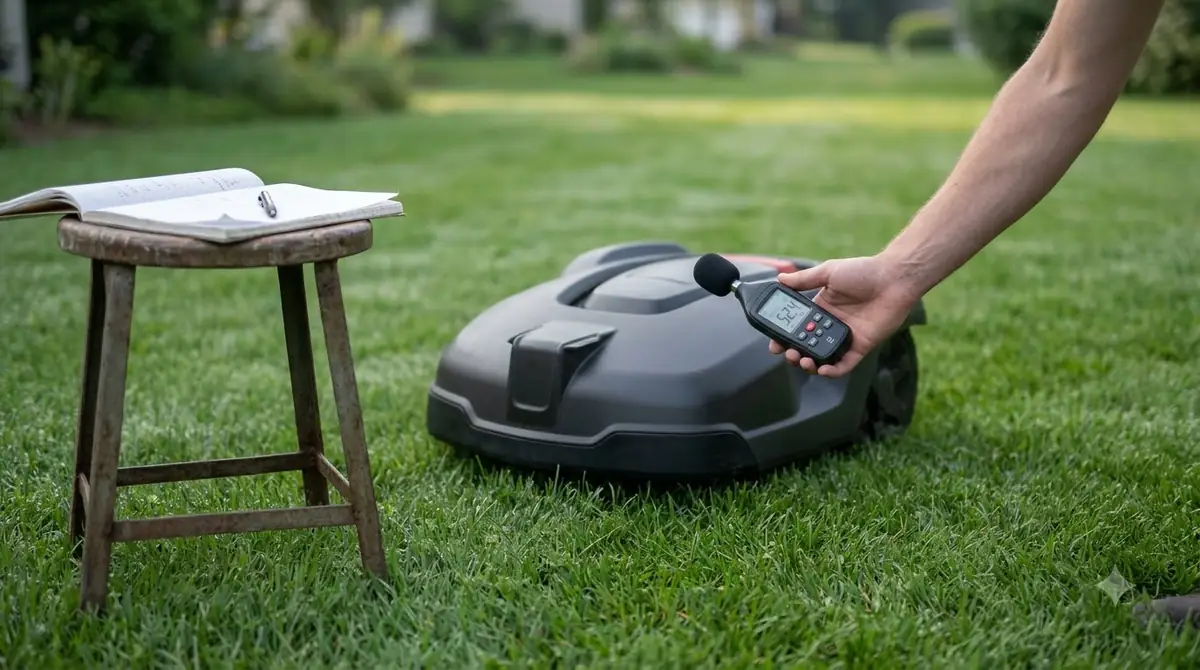
Distance changes what people hear. Robomow says perceived volume drops 6 dB every time the distance doubles. Its example is a 60 dB mower measured at 5 meters, which reads about 54 dB at 10 meters. Our reading is that this is why the same mower can sound loud on a patio yet quiet from the far side of the yard.
Local rules can be stricter than a manufacturer’s figure. Our reading is that you should check your city or HOA rules on mowing hours before you run the mower early or late.
How to reduce robot mower noise by checking blade balance
Two blades on one screw is the first cause to rule out. Husqvarna’s support article says a buzzing sound comes from imbalance in the cutting system, and that two blades on one screw unbalances the cutting disc. Because the fault is mechanical, it is also one of the easiest to check.
- Switch the mower off first. Our reading is that you should never reach into the deck while the mower can start.
- Check each screw. Each blade should have its own screw, with no second blade sharing it.
- Remove any extra blade. Husqvarna’s fix is one blade per screw, so take off anything beyond that.
After the fix, listen again on a normal run. If the buzzing has stopped, the balance was the cause. If it continues, move on to the blade condition check in the next section before you assume a larger fault.
Replace worn, chipped or mismatched blades
Dull, chipped or mismatched blades cause vibration and uneven cutting, according to Husqvarna. Its advice is to replace all three blades together, use new screws each time, avoid mixing blade types, and inspect the blades regularly. Our reading is that changing only one blade can leave the set uneven, which is why the full set is the safer choice. The general steps are in robot mower blade replacement, and Husqvarna owners can follow changing Husqvarna Automower blades.
- Fit new screws every time a blade is replaced.
- Do not mix blade types on one mower.
- Look over the blades regularly for chips and wear.
Robomow’s tips point the same way. It recommends using sharp blades and replacing blades when they wear out, since worn blades are one of the noise sources it lists.
Stop overgrown grass from straining the motor
Tall or dense grass strains the motor and blades, according to Husqvarna. The fix is to raise the cutting height, then lower it gradually, and to mow regularly so the mower stays within its recommended height range.
Our reading is that a mower that runs more often takes a smaller slice of grass on each pass, which keeps the motor under a lighter load than a long, infrequent cut would. That makes regular mowing one practical answer to how to reduce robot mower noise from the motor.
Clean the cutting deck and keep the mower serviced
Robomow advises keeping the mower clean and properly serviced, and fixing technical problems that increase noise. Our reading is that clippings packed under the deck are the easiest thing to check, so clear the deck after mowing and make sure nothing is jammed against the blades. Our guide to how to clean a robot mower covers the routine.

Service is the other half of the same advice. Replace blades when they wear out, keep the blades sharp, and fix any technical problem before it becomes a regular noise. Our reading is that a mower kept clean and maintained is easier to diagnose, because a new sound stands out against a known baseline. A recurring schedule is laid out in a robot mower maintenance checklist.
When to call the dealer instead of fixing it yourself
If you have worked through how to reduce robot mower noise and the sound continues after the checks above, Husqvarna advises contacting a local dealer. Our reading is that a sudden change in sound, or any noise that remains after the blades and grass height have been checked, is a reason to stop and call rather than keep running the mower.
Robomow lists fixing technical problems that raise noise as part of its tips, which is why a persistent sound is worth a service visit rather than a longer wait. Keep a short note of when the noise started, what you checked, and what changed. That record helps a dealer or manufacturer support team work from facts rather than from a description of the sound.
| What you hear | Check first | Source |
|---|---|---|
| Buzzing | Two blades on one screw, unbalanced disc | Husqvarna support |
| Vibration or uneven cut | Dull, chipped or mismatched blades | Husqvarna support |
| Loud in tall grass | Cutting height and mowing frequency | Husqvarna support |
| Loud deck, clippings packed | Clean and service the deck | Robomow tips |
Frequently asked questions
Why does my robot mower buzz?
The first step in how to reduce robot mower noise is to find the cause, and Husqvarna’s support article attributes buzzing to imbalance in the cutting system. The most common cause it lists is two blades on one screw, which unbalances the cutting disc. Check that each screw holds one blade, and remove any extra blade before you try anything else.
How loud is too loud for a robot mower?
Robomow says a mower rated at 60 dB or less usually avoids disputes with neighbors. Sound also drops about 6 dB each time the distance doubles, so a reading at the fence differs from one at the mower. Local rules can still be stricter, so check your city or HOA.
Should I replace one blade or all three?
Husqvarna advises replacing all three blades together, with new screws each time. It also says not to mix blade types on one mower. Our reading is that a single new blade next to worn ones can leave the set uneven, which is why the full set is the safer choice.
Does tall grass make a robot mower louder?
Husqvarna says tall or dense grass strains the motor and blades. Raise the cutting height first, then lower it gradually, and mow regularly so the mower stays within its recommended height range. Our reading is that regular, shorter cuts keep the motor working under a lighter load.
Sources
- Why is my Automower robotic lawn mower making a buzzing sound? (Husqvarna support): buzzing from imbalance, two blades on one screw, replacing all three blades, tall grass and the dealer advice.
- How loud is a robotic mower? (Robomow blog, dated 23 May 2021): the 60 dB neighbor point, the 6 dB per doubling of distance, household reference levels and maintenance tips.
 Up next7 min readLearnRobot Mower Not Charging? How to Fix It Step by StepUpdated Nov 11, 2026
 7 min readLearnWhat Is a Robot Lawn Mower?Updated Nov 11, 2026
 9 min readLearnHow to Install a Robot Mower Boundary WireUpdated Nov 11, 2026
 9 min readLearnShould I Buy a Robot Lawn Mower? Who It Suits and Who Should Skip ItUpdated Nov 11, 2026
 7 min readLearnBest Mowing Height for a Robot Mowed LawnUpdated Nov 11, 2026
 8 min readLearnCan Robot Mowers Be Left Outside?Updated Nov 11, 2026